
Clean Up Photos: Phone Cleaner
Free up storage fast with a safe basket you review before deleting
•
Scan your library in minutes
•
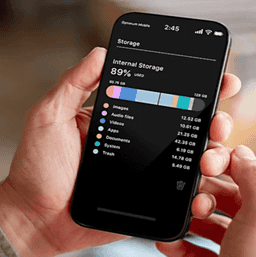
See the biggest space eaters instantly
•
Review a safe basket before cleanup

Clean faster with full control:

"More space. Less stress."
•
See how many GB you can free up in one scan
•
Clear storage without digging through albums

"I choose what gets removed."
•
Nothing is deleted without your confirmation
•
Review your basket before cleaning

"I can fix it in minutes."
•
Quick picks: heavy videos, screencasts, screenshots, Live Photos
•
One flow from scan to cleanup
"Stay clean automatically"
•
Optional auto-scan reminders when storage is low
•
Keep your gallery under control with less effort
Has this happened with you?
Storage is full and you can’t record a video
😢
999
Apps won’t install or iOS updates fail
😢
999
Too many screenshots and screen recordings
😢
999
Gallery cleanup feels endless
😢
999
You’re afraid a cleaner will delete something important
😢
999
You need space right now, not “someday”
😢
999
Your phone feels slow because storage is packed
😢
999
You want a safe, controlled cleanup
😢
999
How we solve your daily tasks

Find what eats storage
•
Scan your media library and see reclaimable GB
•
Breakdown by categories: heavy videos, screencasts, Live Photos, screenshots

Pick files safely
•
You review candidates before anything happens
•
Favorites and recent items can be excluded to reduce risk
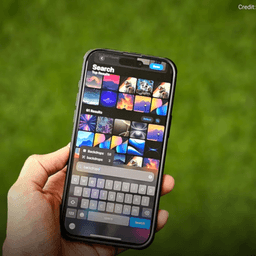
Clean in one guided flow
•
Step-by-step review: category by category
•
Clear faster without getting lost in the Photos app

Keep storage under control
•
Optional auto-scan when storage gets low
•
Get reminders and confirm cleanup when you’re ready
Still have doubts?
Worried it will delete something important?
"The basket review made it feel safe. Nothing happens without my tap."

David S.
Need space fast before a trip or event?
"Saw +GB right after scanning and freed space in minutes."

Liza L.
Tired of endless manual sorting?
"It showed the biggest space eaters first. No more digging."

Taylor K.
Why not just do it in Photos?
"This flow is faster. I cleaned screenshots and screen recordings in one run."

Daniela P.